How to install
Use a tokpi chat box with WEFLAB: paste the copied code into your WEFLAB chat box settings, then check it on your stream.
WEFLAB is a Korean chat box service for CHZZK and SOOP streams. Its menus are in Korean, so button names below are in Korean with an English translation. Card text (like CHZZK Cheese donations) is in Korean too.
Set up a tokpi chat box as a StreamElements custom widget: paste four files into a widget, then add the overlay to OBS. It takes about 5 minutes.
You need a free StreamElements account. The widget shows chat from Twitch, Kick and YouTube, and OBS (or Streamlabs Desktop) only needs the overlay URL.
Use a tokpi chat box as a OneComme (わんコメ) template: add the zip to OneComme, then add it to OBS. It takes about 3 minutes.
You need OneComme. It shows comments from YouTube, Twitch, TwitCasting, Niconico and other sites connected to OneComme. Button names below are the Japanese ones with an English translation; card text and the guide inside the zip are in Japanese.
Step 1. Download and unzip
On the Halloween page, click View details for a chat box, check the description and preview, then click Download (.zip) and unzip it. Inside are
widget.html,widget.css,widget.jsandwidget.fields.json, pluspreview.pngthat shows how it looks.Step 2. Create a new overlay
Log in to StreamElements with the channel you stream on (Twitch, Kick or YouTube). Go to Streaming tools → Overlays and click New overlay.
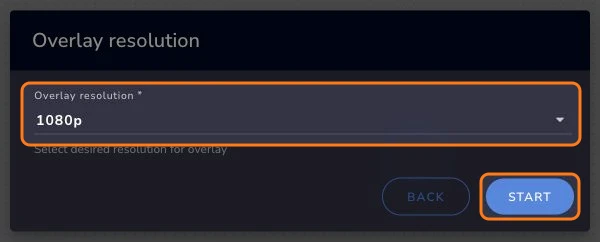
The editor opens in a new tab. Keep 1080p and click Start.
 View full size (new tab)
Step 3. Add a custom widget
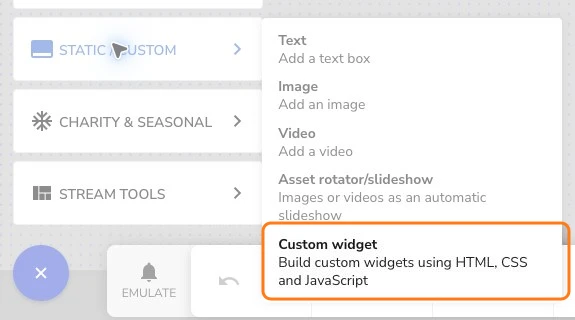
Click Add widget → Static / Custom → Custom widget. Then, in the widget’s Settings, click Open editor.
 View full size (new tab)
Step 4. Paste the four files
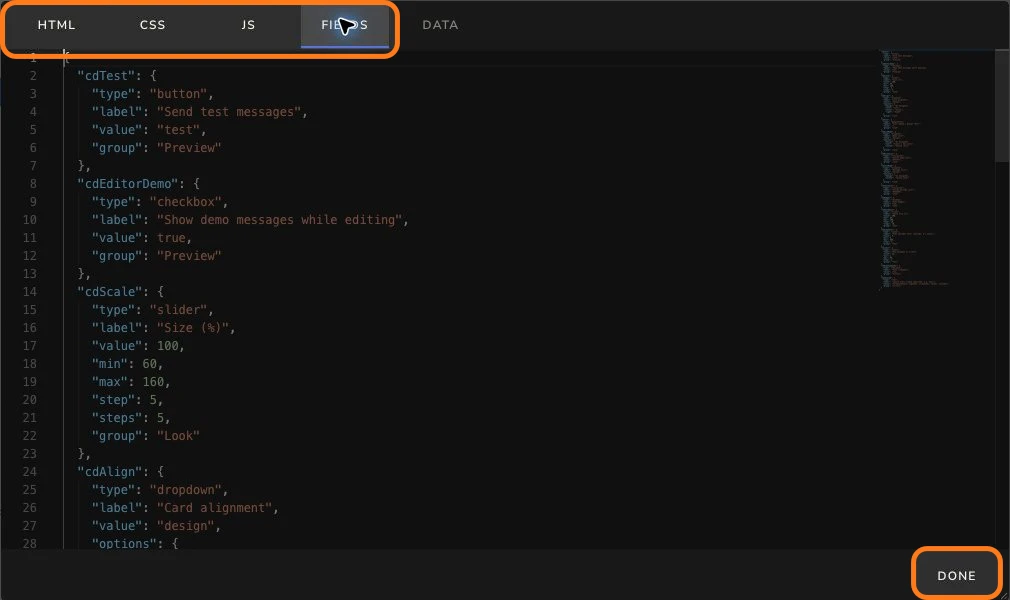
In each tab, delete what is there and paste the matching file:
widget.html→ HTMLwidget.css→ CSSwidget.js→ JSwidget.fields.json→ FIELDS
Leave the DATA tab as it is, then click Done.
 View full size (new tab)
Step 5. Set the size and save
In Position, size and style, start with a widget width of 500 px and height of 800 px, and place the widget where your chat goes.
In Settings → Look, keep Size (%) at 100. At 120%, allow around 600 px of widget width and check long names, subscription and donation cards.
Then click Save (top right).
The editor plays demo messages so you can see the design before you go live (turn off “Show demo messages while editing” to hide them). “Send test messages” adds one message for each role, plus a long one.
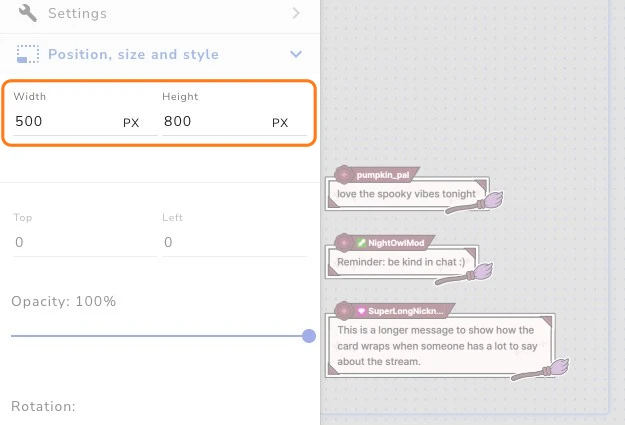 View full size (new tab)
Step 6. Add the overlay to OBS
Use the link icon (Copy overlay URL) at the top of the editor, or Copy URL in the overlay list, and add it to OBS as a Browser source.
Match the full overlay resolution: 1920 × 1080 for the 1080p overlay above. The 500 × 800 widget is only the chat area inside that overlay.
Streaming on more than one platform? StreamElements keeps overlays per channel, so repeat these steps in each channel you connected (switch channel in the StreamElements account menu).
Keep this URL private: anyone with it can show your overlay.
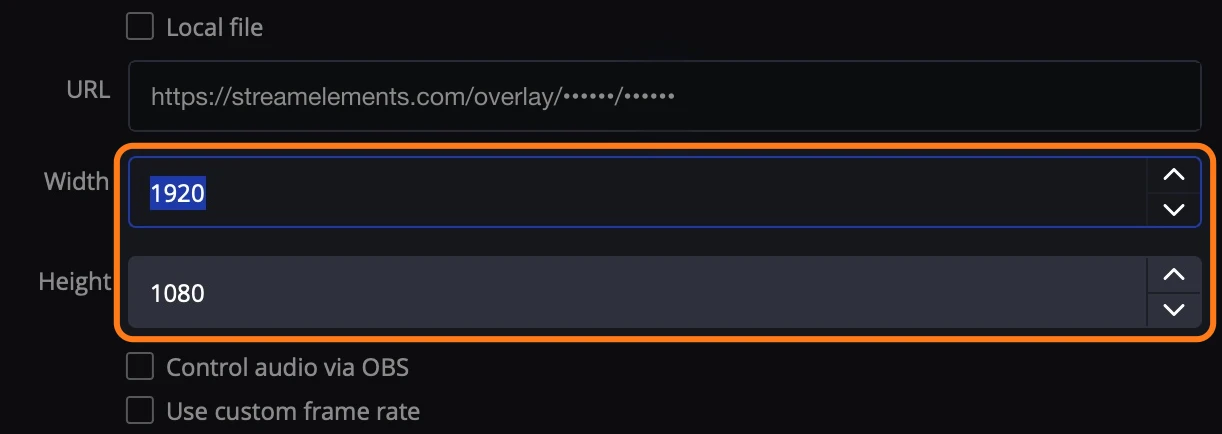 View full size (new tab)
Settings
In the overlay editor, open the widget’s Settings.
- Size (%)
- Scales the whole chat, art included
- Card alignment
- As designed, or all cards left / center / right
- Font
- Any Google Font; empty keeps the design font
- Name color · Message color
- As designed, the viewer’s own color (names), or your own color
- Show badges
- Platform badges before the name
- Emote size (%)
- Emote images in messages
- Hide messages after
- Seconds on screen; 0 keeps them until newer messages push them out
- Max messages on screen
- Oldest message leaves first
- Hide !commands
- Skips messages that start with !
- Ignore users
- Comma-separated names, e.g. your bots
Card for each role
- Streamer (broadcaster / channel owner)
- Streamer card
- Subscriber · YouTube member
- Subscriber card
- Moderator · VIP · everyone else
- Viewer card
- Tip · Super Chat · Bits
- Donation card (amount and message)
- Sub · gift subs · YouTube membership
- Subscription card
Good to know
- Card art is drawn in fixed colors; the color settings change the text only.
- Tips, Super Chats, Bits, subs and memberships show as their own cards in the same design. A free YouTube channel subscription shows no card. Try them with the editor’s Emulate button.
- Deleted messages disappear on Twitch. On Kick, StreamElements did not send delete events in our tests, so deleted messages stay until they time out.
- YouTube emoji arrive as text such as :face-blue-smiling:, and YouTube sends no badge images. Deleting a YouTube message was not confirmed in our tests.
- We checked it with live chat on Twitch, Kick and YouTube: messages and roles on all three, badges and emotes on Twitch and Kick, message delete on Twitch.